

Stop Blaming Your Internet Provider for Wi-Fi Problems
It always happens at the worst possible moment. You finally settle into a gripping TV show, and with attention spans increasingly fragmented, that alone feels like a victory. Then, just as the plot thickens… buffering strikes. Or you step outside for an important work call, join a Zoom meeting, or try to stream the footy, only to encounter the same frustrating issue.
The good news is that much of this poor internet performance can be resolved without switching providers or paying higher fees. Often, the problem isn't the internet connection entering your home, but rather how the Wi-Fi signal travels through your living space.
Why Your Router's Location Matters More Than You Think
Val Quinn, consumer technology expert and CEO of GadgetGuy.com.au, says many Australian households are pointing fingers at the wrong culprit. "Your NBN connection might be flying into the house at full speed, but if the router is hidden in a cupboard behind the television, the signal has to battle through walls, pipes, and even your microwave to reach the back bedroom," Quinn explains.

Sometimes, the solution is as straightforward as repositioning your router to a more central, open location. In other homes, particularly those with double storeys, thick walls, or expansive layouts, more advanced fixes are necessary.
The Rise of Mesh Wi-Fi Systems as the Ultimate Solution
This is where mesh Wi-Fi technology has truly taken off. Think of it as having backup players for your internet connection. Instead of relying on a single router struggling to cover the entire property, you deploy multiple units throughout the home that collaborate as one seamless network.
These units pass the signal from room to room, effectively eliminating dead zones, weak spots, and random dropouts. For larger homes, outdoor areas, or buildings with challenging architecture, mesh systems offer a far smarter alternative to repeatedly rebooting your modem and hoping for different results.
Brands like eero have gained popularity by creating systems that maintain a stable connection as you move around, ensuring your phone, television, and laptop remain consistently online. Now, this same technology is expanding beyond interior spaces.
Eero's Outdoor 7 Brings Wi-Fi to Gardens and Patios
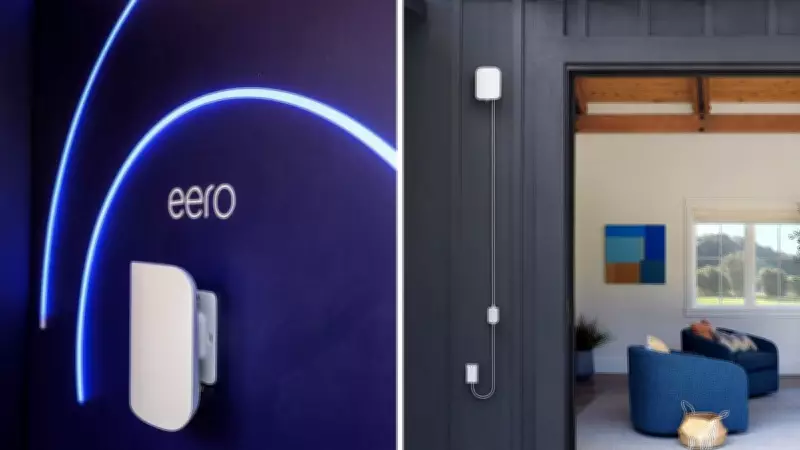
Eero has recently launched its new Outdoor 7 model in Australia, specifically engineered to extend Wi-Fi coverage beyond the back door into patios, gardens, sheds, and entertainment areas where signals typically weaken.
This weather-resistant device is designed to blend discreetly into outdoor settings, complete with mounting hardware and straightforward setup instructions. It also features a high-speed 2.5GbE port with Power-over-Ethernet support, allowing both power and internet to be delivered through a single cable.
This innovation is particularly timely. New research commissioned by eero reveals that nearly one in three Australians have upgraded their outdoor spaces over the past three years, often investing more than $10,000, while two-thirds still experience internet issues at home.
The eero Outdoor 7 is currently available for AU$729.99 through Amazon Australia, JB Hi-Fi, Officeworks, and Bunnings.
Where Do Traditional Wi-Fi Extenders Fit In?
Wi-Fi extenders remain on the market, with affordability being the primary reason some Australians opt for them. They can provide a cheaper method to enhance coverage in a specific trouble spot without the expense of a full mesh system.
This approach is perfectly reasonable for certain situations. However, extenders typically function as a temporary patch rather than a comprehensive whole-home solution. Many models simply repeat an already weakened signal, potentially resulting in slower speeds, inconsistent performance, and devices clinging to suboptimal connections as you move about.
Extenders can still be practical for addressing a single dead zone in a spare room, garage, or isolated area.
Five-Minute Improvements for Better Wi-Fi at Home
Before investing additional money, start with these simple, cost-free adjustments. Relocate your router to an open area, ideally near the centre of your home, and elevate it on a shelf or table rather than hiding it low to the ground.

Keep it away from bulky electronics, microwaves, and major appliances that can interfere with the signal. Then, conduct a quick assessment. Many households are paying for internet speeds that their outdated routers cannot properly handle, or using the same setup installed years ago without any updates.
As Val Quinn highlights, numerous people plug in their router on day one and never reconsider its placement or settings. "Firmware becomes outdated, configurations are neglected, and performance can gradually decline year after year," he notes.
Restart your router, check for available firmware updates, and observe if performance improves. Often, a few minutes of maintenance can yield surprisingly significant benefits without spending an extra cent.